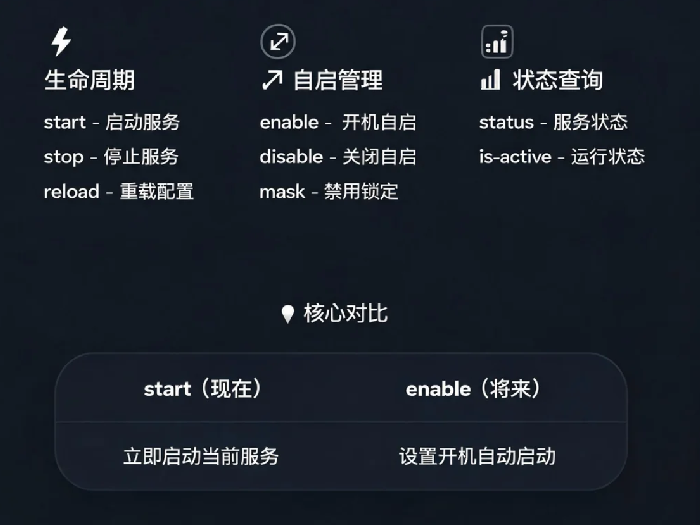
你想让Nginx开机自启动,知道用systemctl enable nginx。你想重启服务,用systemctl restart nginx。但enable和start到底有什么区别?reload和restart什么时候用哪个?mask和disable都是禁用,有什么不同?
你每天都在用systemctl,可能只用了它一半的功能。
今天把systemctl的核心命令讲透,让你真正掌控系统服务。
先看一个数据
systemd是大多数Linux发行版默认的init系统,它管理的服务可以通过systemctl命令进行控制。systemctl start和systemctl enable是两个独立操作,经常被混淆,它们有不同的作用。
systemctl的典型工作流程
一个典型服务从安装到运行的管理流程:
bash
# 1. 安装软件包
apt install nginx

# 2. 查看服务状态
systemctl status nginx

# 3. 立即启动服务
systemctl start nginx

# 4. 设置开机自启
systemctl enable nginx

# 5. 修改配置后重载
systemctl reload nginx

# 6. 停止服务
systemctl stop nginx
生命周期管理:start、stop、restart、reload
这些命令控制服务的运行状态。
| 命令 | 作用 | 适用场景 |
|---|---|---|
| start | 启动服务 | 服务当前未运行 |
| stop | 停止服务 | 需要停掉服务做维护 |
| restart | 完全停止再启动 | 配置有较大改动,或服务状态异常 |
| reload | 重新加载配置,不中断服务 | 配置文件改动,且服务支持热重载 |
start和enable的区别(最容易混淆的):
- start:现在启动服务(立即生效)
- enable:下次开机时自动启动(持久化配置)
bash
# 正确的新服务部署流程
systemctl enable nginx   # 设置开机自启
systemctl start nginx # 立即启动如果只start不enable:服务现在能跑,重启后不会自动起来。
如果只enable不start:下次开机才会启动,现在还是停的。
restart vs reload:
- restart:完全停掉再启动,所有连接会中断。不管服务是否支持热重载,都能生效。
- reload:告诉服务重新读取配置文件,不中断现有连接。但要求服务支持热重载(Nginx、Apache支持,部分服务不支持)。
bash
# 改了nginx配置
systemctl reload nginx   # 优先用这个,不中断连接

# 改了MySQL配置
systemctl restart mysql # MySQL不支持reload,只能用restart用try-reload更安全:
bash
systemctl try-reload nginx如果服务不支持reload,自动转为restart。
开机自启管理:enable、disable、mask、unmask
这些命令控制服务是否自动启动。
| 命令 | 作用 |
|---|---|
| enable | 设置开机自启(创建软链接) |
| disable | 取消开机自启(移除软链接) |
| is-enabled | 检查是否已设置开机自启 |
| mask | 彻底禁用(软链接到/dev/null) |
| unmask | 解除彻底禁用 |
enable vs mask:
- disable:取消自启,但你可以手动start
- mask:彻底禁用,连手动start都不允许,会报错Failed to start unit: Unit is masked
bash
systemctl mask nginx
systemctl start nginx
# 报错:Failed to start nginx.service: Unit nginx.service is masked.
检查状态:
bash
systemctl is-enabled nginx
# 返回 enabled / disabled / masked / static
状态查询:status、is-active、list-units
bash
systemctl status nginx输出解读:
- Loaded:服务定义文件位置 + 是否已加载到内存
- Active:当前运行状态(active正在运行 / inactive停止 / failed失败)
- Main PID:主进程ID
- Tasks:该服务启动的进程数量
- Memory:内存占用
- CGroup:服务在cgroup中的归属信息
- 日志:最近的日志输出,可直接看到启动错误
检查服务是否正在运行:
bash
systemctl is-active nginx
# 返回 active / inactive / failed
列出所有服务:
bash
systemctl list-units --type=service
# 只显示已加载到内存的服务

systemctl list-unit-files --type=service
# 显示所有已安装的服务文件(不管是否运行)
服务文件位置
systemd服务文件(.service)有多个存放位置,加载优先级不同:
| 路径 | 用途 |
|---|---|
| /etc/systemd/system/ | 用户自定义,优先级最高 |
| /lib/systemd/system/ | 软件包默认安装,优先级最低 |
| /run/systemd/system/ | 运行时临时创建,重启后消失 |
查看服务文件的位置:
bash
systemctl status nginx | grep Loaded
# Loaded: loaded (/lib/systemd/system/nginx.service; enabled)
实战示例
bash
# 1. 安装nginx并设置自启
apt install nginx -y
systemctl enable nginx
systemctl start nginx

# 2. 查看状态
systemctl status nginx

# 3. 修改配置后重载
vim /etc/nginx/nginx.conf
systemctl reload nginx

# 4. 临时停掉维护
systemctl stop nginx
# 维护完成
systemctl start nginx

# 5. 彻底禁用(防意外启动)
systemctl mask nginx
真实案例
某运维在配置Nginx时,用了systemctl enable nginx但忘记执行systemctl start nginx。重启服务器后发现Nginx没起来。检查发现服务状态是enabled但is-active为inactive。他以为enable就是启动,误会了这两个命令的职责。
最后一句
start管现在,enable管将来。reload不中断连接,restart彻底重启。disable允许手动启动,mask彻底禁用。
知道这些区别,你才能准确控制服务行为。下次配置新服务,记住先enable再start——一个管开机后,一个管现在。两个都做了,才叫真正部署完成。