Netcatty是一款现代化的跨平台SSH客户端和终端管理器,最近尝试切换到这个SSH客户端使用,用了也有一段时间了,确实挺好用的,开源免费还支持多端同步,为了使用它的同步功能,我自建了一个WebDAV服务,本文记录下WebDAV服务部署和Netcatty同步配置。
安装Docker:
apt update
apt install curl nginx python3-certbot-nginx
curl -fsSL https://get.docker.com -o get-docker.sh
sh get-docker.sh
创建目录和compose文件:
mkdir -p /opt/webdav/data/netcatty && cd /opt/webdav && nano docker-compose.yml写入如下内容:
name: webdav

services:
  webdav:
    container_name: webdav
    image: ghcr.io/hacdias/webdav:latest
    ports:
     - 127.0.0.1:6065:6065
    restart: always
    volumes:
      - ./data:/data
      - ./config.yml:/config.yml:ro
新建一个配置文件:
nano config.yml写入如下内容,注意将password改为一个高强度的密码:
address: 0.0.0.0
port: 6065
tls: false
prefix: /
debug: false
noSniff: false
behindProxy: true
directory: /data
permissions: CRUD

log:
  format: console
  colors: true
  outputs:
    - stderr
users:
  - username: netcatty
    password: hidden
    directory: /data/netcatty
启动:
docker compose up -d请务必配置TLS反向代理,以保护basic auth的账号密码防止被中间人获取。
nano /etc/nginx/sites-available/webdav写入如下内容:
server {
    listen 80;
    listen [::]:80;
    server_name webdav.example.com;
    client_max_body_size 0;

    location / {
        proxy_pass http://127.0.0.1:6065;
        proxy_set_header Host $host;
        proxy_set_header X-Real-IP $remote_addr;
        proxy_set_header X-Forwarded-For $proxy_add_x_forwarded_for;
        proxy_set_header X-Forwarded-Proto $scheme;
        proxy_redirect off;

        set $dest $http_destination;
        if ($http_destination ~ "^https://webdav.example.com/(?(.+))") {
            set $dest /$path;
        }
        proxy_set_header Destination $dest;
    }
}
启用站点:
ln -s /etc/nginx/sites-available/webdav /etc/nginx/sites-enabled/webdav签发证书:
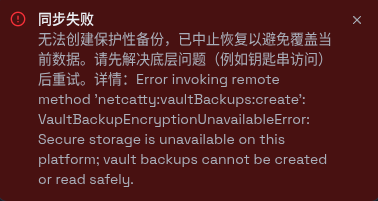
certbot --nginx下面简单说一下Netcatty的同步配置,我主要用Windows10和openSUSE风滚草,两边设置同一个主密码,然后配置刚部署的WebDAV服务连接信息正常情况下就能用了。Windows这边没啥问题开箱即用,主要是openSUSE这边,我用的是KDE桌面,配置好了后同步报错:
[ ]
]
这里说的钥匙串指的就是系统的安全存储,然后用这个命令看了一下当前系统用的是哪种安全存储:
busctl --user list | grep -Ei 'kwallet|secrets'不知道为啥明明是KDE桌面却使用的是gnome-keyring:
[ ]
]
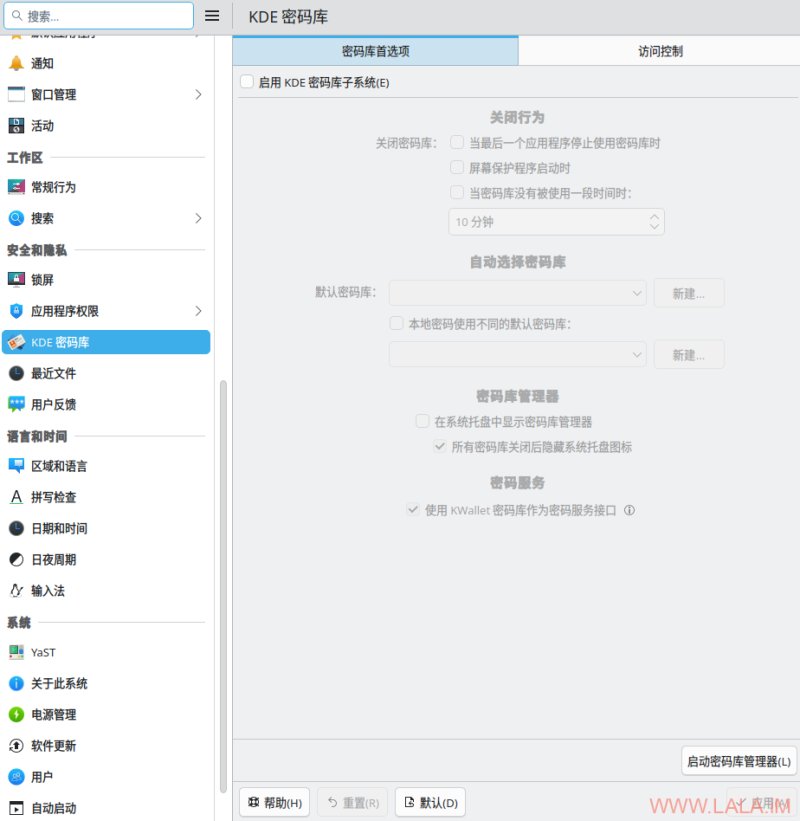
正常情况下应该使用KDE钱包才对,然后我找到系统设置-KDE密码库:
[ ]
]
1.在这里点击“启用KDE密码库子系统”
2.勾选使用KWallet密码库作为密码服务接口。
3.如果没有默认密码库,就点击“新建”创建一个密码库。
配置好了后光注销不行必须重启系统。再执行之前的命令验证一遍:
busctl --user list | grep -Ei 'kwallet|secrets'正常的话应该显示:
[ ]
]
回到Netcatty检查一下就正常了,也可以同步了:
[ ]
]
有点抽象的是,遇到这个问题的时候openSUSE这边的Netcatty不知道怎么回事把我云端(WebDAV服务器)的数据给覆盖了。。正常情况下我Windows这边假设同步到云端有3个主机,那么openSUSE这边也应该同步获取这3个主机才对,但是openSUSE直接把云端的3个主机给删了,这导致Windows这边再去同步云端的数据把我Windows这边的3个主机也搞没了。不过还好当时我主要是测试还没正式使用,在解决KDE的问题后,双端已经能够正常同步了,只是我觉得Netcatty在处理这种意外情况的时候表现有点不佳。