第一、出现的问题
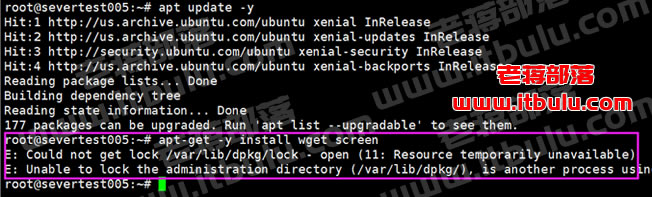
> root@severtest005:~# apt-get -y install wget screen
> E: Could not get lock /var/lib/dpkg/lock - open (11: Resource temporarily unavailable)
> E: Unable to lock the administration directory (/var/lib/dpkg/), is another process using it?
这是出现的故障提示,仅仅安装简单的wget和screen都会出现这样的提示。
第二、解决方法
主要问题是目前apt还在运行,我们可以重启服务器看看,然后再执行。但是老蒋这里没有这么办,而是检查占用进程,先禁止。
> ps afx|grep apt
检查进程。

这里我们可以先将1189和2080进程停止掉。
> sudo kill -9 1189
> sudo kill -9 2080
然后我们再删除锁定文件
> sudo rm /var/lib/dpkg/lock
然后我再 apt update -y 升级源。然后我再重新安装,发现还是不行,有新的提示。
> E: dpkg was interrupted, you must manually run 'dpkg --configure -a' to correct the problem

这个问题老将有再"解决遇到"dpkg was interrupted, you must manually run"问题"有解决过,只需要根据提示。
> dpkg --configure -a
执行即可。然后我们重启服务器,在正常就可以安装需要的软件。