在这篇文章中,老蒋直接采用无插件模块方式,自动调用网站作者信息实现的。
1、调用脚本
> //作者信息
> function wpb_author_info_box( $content ) {
> global $post;
> // Detect if it is a single post with a post author
> if ( is_single() && isset( $post->post_author ) ) {
> // Get author's display name
> $display_name = get_the_author_meta( 'display_name', $post->post_author );
> // If display name is not available then use nickname as display name
> if ( empty( $display_name ) )
> $display_name = get_the_author_meta( 'nickname', $post->post_author );
> // Get author's biographical information or description
> $user_description = get_the_author_meta( 'user_description', $post->post_author );
> // Get author's website URL
> $user_website = get_the_author_meta('url', $post->post_author);
> // Get link to the author archive page
> $user_posts = get_author_posts_url( get_the_author_meta( 'ID' , $post->post_author));
> if ( ! empty( $display_name ) )
> $author_details = '<p class="author_name">About ' . $display_name . '</p>';
> if ( ! empty( $user_description ) )
> // Author avatar and bio
> $author_details .= '<p class="author_details">' . get_avatar( get_the_author_meta('user_email') , 90 ) . nl2br( $user_description ). '</p>';
> $author_details .= '<p class="author_links"><a href="'. $user_posts .'">View all posts by ' . $display_name . '</a>';
> // Check if author has a website in their profile
> if ( ! empty( $user_website ) ) {
> // Display author website link
> $author_details .= ' | <a href="' . $user_website .'" target="_blank" rel="nofollow">Website</a></p>';
> } else {
> // if there is no author website then just close the paragraph
> $author_details .= '</p>';
> }
> // Pass all this info to post content
> $content = $content . '<footer class="author_bio_section" >' . $author_details . '</footer>';
> }
> return $content;
> }
> // Add our function to the post content filter
> add_action( 'the_content', 'wpb_author_info_box' );
> // Allow HTML in author bio section
> remove_filter('pre_user_description', 'wp_filter_kses');
将代码直接添加到当前主题functions.php文件中。
2、添加CSS样式
> .author_bio_section{
> background: none repeat scroll 0 0 #F5F5F5;
> padding: 15px;
> border: 1px solid #ccc;
> }
> .author_name{
> font-size:16px;
> font-weight: bold;
> }
> .author_details img {
> border: 1px solid #D8D8D8;
> border-radius: 50%;
> float: left;
> margin: 0 10px 10px 0;
> }
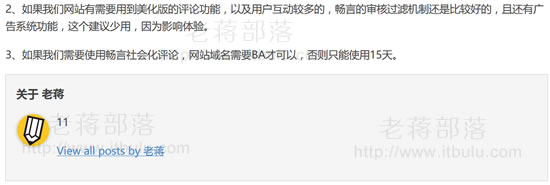
添加CSS到当前主题中,这样我们刷新页面看看是否调用出来。
3、修正个人信息
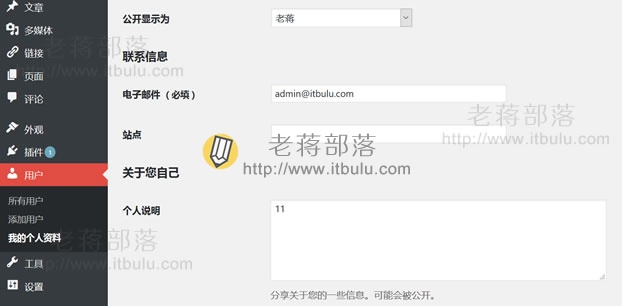
我们可以看到已经可以调用个人信息,然后我们去后台个人信息里补全个人信息即可。
当然,如果我们需要美化功能,可以调整添加进Functions.php脚本的布局,以及CSS样式,也可以手工加一点文件,这个主要还是看我们各自的需要。