对于WEB环境,我们用Lighttpd,因为比Nginx或者Apache节省资源。数据库我们更不能用占用资源较大的MYSQL,而是用占用资源较小的SQLite。所以我们在选择程序的时候,可以用支持SQLite数据库的ZBLOG PHP或者TYPECHO程序等。WORDPRESS占用内存较大,我们就不在小内存VPS中使用。
第一、安装Lighttpd
> apt-get install lighttpd
有出现[y/n],什么输入y然后回车继续。
第二、安装SQLite
> apt-get install sqlite
第三、安装PHP环境
> apt-get install php5-cgi php5-curl php5-gd php5-idn php-pear php5-imagick php5-imap php5-mcrypt php5-mhash php5-ming php5-ps php5-pspell php5-recode php5-snmp php5-sqlite php5-tidy php5-xmlrpc php5-xsl
我们安装PHP环境以及站点需要的PHP组件。
第四、配置PHP.INI文件
> vi /etc/php5/cgi/php.ini
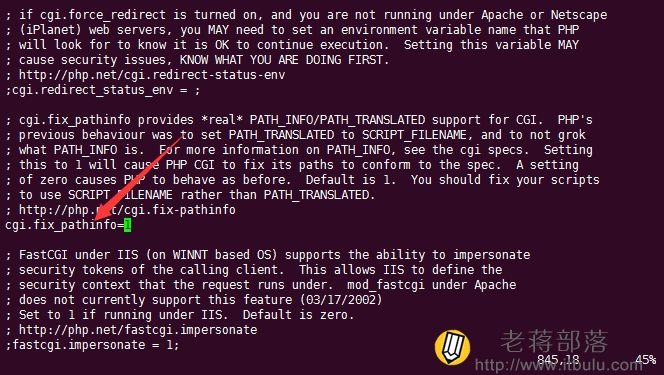
查找cgi.fix_pathinfo命令,把前面的;去掉,检查是不是1,保存退出。
第五、新建一个用户管理运行Lighttpd
> useradd -d /home/wwwroot -m -s /bin/bash www
第六、修改Lighttpd配置
> vi /etc/lighttpd/lighttpd.conf
直接把里面的内容替换掉
> server.modules = (
> "mod_access",
> "mod_alias",
> "mod_compress",
> "mod_redirect",
> "mod_rewrite",
> "mod_fastcgi",
> )
> server.document-root = "/var/www"
> server.upload-dirs = ( "/var/cache/lighttpd/uploads" )
> server.errorlog = "/var/log/lighttpd/error.log"
> server.pid-file = "/var/run/lighttpd.pid"
> server.username = "www"
> server.groupname = "www"
> index-file.names = ( "index.php", "index.html",
> "index.htm", "default.htm",
> " index.lighttpd.html" )
> url.access-deny = ( "~", ".inc" )
> static-file.exclude-extensions = ( ".php", ".pl", ".fcgi" )
> include_shell "/usr/share/lighttpd/use-ipv6.pl"
> dir-listing.encoding = "utf-8"
> server.dir-listing = "enable"
> compress.cache-dir = "/var/cache/lighttpd/compress/"
> compress.filetype = ( "application/x-javascript", "text/css", "text/html", "text/plain" )
> include_shell "/usr/share/lighttpd/create-mime.assign.pl"
> include_shell "/usr/share/lighttpd/include-conf-enabled.pl"
> fastcgi.server = ( ".php" => ((
> "bin-path" => "/usr/bin/php5-cgi",
> "socket" => "/tmp/php.socket",
> "max-procs" => 1,
> "bin-environment" => (
> "PHP_FCGI_CHILDREN" => "4",
> "PHP_FCGI_MAX_REQUESTS" => "1000"
> ),
> )))
第七、修改日志目录的所有者
chown -R www:www /var/log/lighttpd
第八、重启Lighttpd
/etc/init.d/lighttpd restart
这样我们的环境就搭建完成。后面我们就可以开始新建需要在环境中安装的站点。