安装git-lfs
需要git版本高于1.8.3
**Debian / Ubuntu**
$ curl -s https://packagecloud.io/install/repositories/github/git-lfs/script.deb.sh | sudo bash
$ sudo apt-get install git-lfs
**MacOS (Using Homebrew)**
$ brew update
$ brew install git-lfs
克隆项目
**在huggingface搜索你想要下载的模型,然后点击Files and versions:**
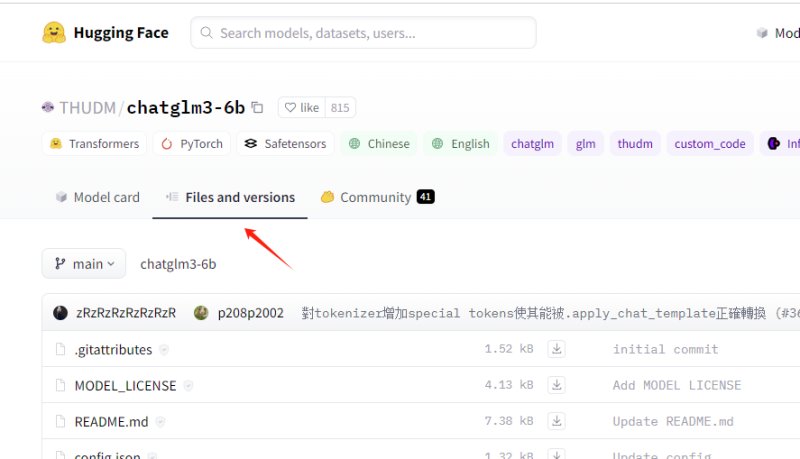
**然后右边3个点,点开有个Clone repository:**
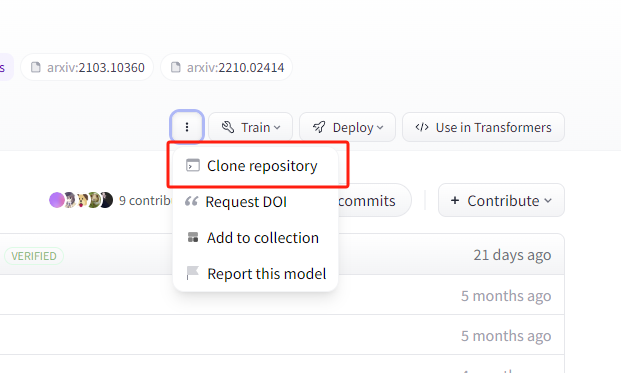
点开就有克隆命令了。
**然后指向项目克隆:**
# 确认lfs已安装
git lfs install
# 先下载项目文件
GIT_LFS_SKIP_SMUDGE=1 git clone https://huggingface.co/THUDM/chatglm3-6b

# 进入项目目录,拉取模型文件
cd chatglm3-6b
git lfs pull --include="*.bin"
然后模型文件就开始正常拉取了。
参考资料:
https://blog.csdn.net/flyingluohaipeng/article/details/130788293
https://stackoverflow.com/questions/48734119/git-lfs-is-not-a-git-command-unclear
https://huggingface.co/docs/hub/repositories-pull-requests-discussions