ossutil命令行工具下载安装
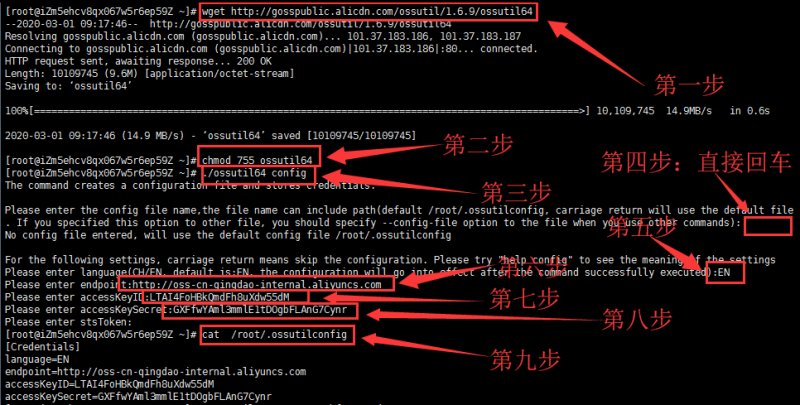
现在的云服务器为了保证安全性和稳定性,一般都会选择Linux 64位系统,本文以centos 7.7 64位系统来写教程,共9小步就可以完成下载安装。
第一步:从阿里云官方下载ossutil命令行工具
> wget http://gosspublic.alicdn.com/ossutil/1.6.10/ossutil64
第二步:修改文件ossutil64执行权限
> chmod 755 ossutil64
第三步:使用交互式配置生成ossutil64配置文件
> ./ossutil64 config
输入上面的命令后会进入交互模式,具体看下面的代码:
he command creates a configuration file and stores credentials.
Please enter the config file name,the file name can include path(default /root/.ossutilconfig, carriage return will use the default file. If you specified this option to other file, you should specify –config-file option to the file when you use other commands):(第四步:这里直接回车,使用默认路径创建配置文件)
No config file entered, will use the default config file /root/.ossutilconfig
For the following settings, carriage return means skip the configuration. Please try “help config” to see the meaning of the settings
Please enter language(CH/EN, default is:EN, the configuration will go into effect after the command successfully executed):EN(第五步:这里可以直接回车,选择默认的英文,也可以输入大写的EN,然后敲回车。)
Please enter endpoint: http://oss-cn-beijing-internal.aliyuncs.com (第六步:这里输入Bucket所在地域的域名,必须有http://,在OSS管理页面获取。)
Please enter accessKeyID:LTAIVZGND2ErRTa7 (第七步:这里输入阿里云accessKeyID信息)
Please enter accessKeySecret:yxgVMMDjodpJko2MR64AuCkkslbkok (第八步:这里输入阿里云accessKeySecret信息)
Please enter stsToken:(第九步:这里直接回车)
第十步:查看刚才创建的ossutil配置文件
> cat /root/.ossutilconfig
这一步可以忽略,查看时是您前面配置的信息,具体显示如下:
[Credentials]
language=EN
endpoint= http://oss-cn-beijing-internal.aliyuncs.com
accessKeyID=LTAIVZGND2ErRTa7
accessKeySecret=yxgVMMDjodpJko2MR64AuCkkslbkok
ossutil命令行工具上传下载超大文件
ossutil上传超大文件
> ./ossutil64 cp ./chaoda_2020.zip oss://ceshi/chaoda_2020.zip
把当前目录下chaoda_2020.zip文件上传到OSS里面名称为ceshi的bucket。ceshi是在OSS里面创建的bucket名称,chaoda_2020.zip是要上传的文件名称。
ossutil下载超大文件
> ./ossutil64 cp oss://ceshi/chaoda_2020.zip /www/data
把名称为ceshi的bucket里面的文件chaoda_2020.zip下载到本地服务器的/www/data目录。ceshi是在OSS里面创建的bucket名称,chaoda_2020.zip是要下载的文件名称,/www/data本地服务器的路径。
