sRGB牛人大佬:
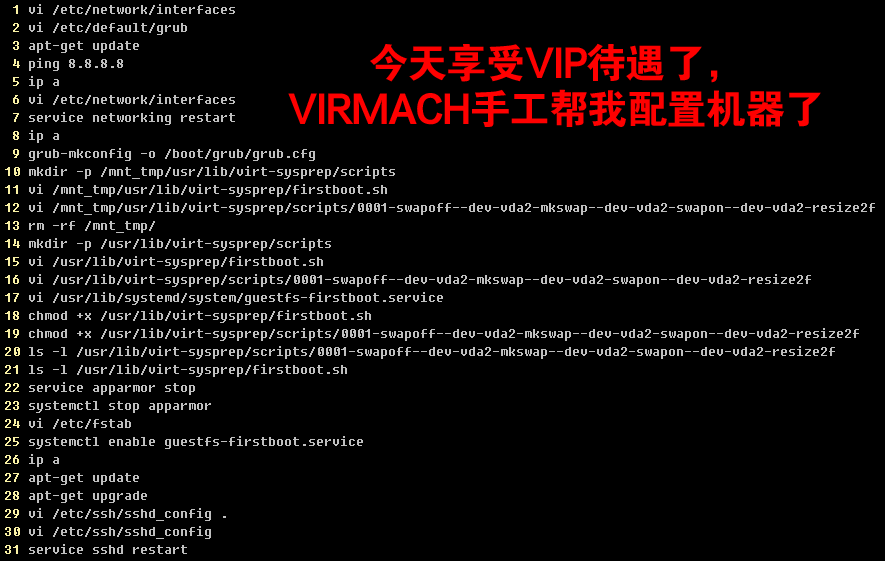
你们新开几机器,有 shell 命令 历史记录吗
- 1 vi /etc/network/interfaces
- 2 vi /etc/default/grub
- 3 apt-get update
- 4 ping 8.8.8.8
- 5 ip a
- 6 vi /etc/network/interfaces
- 7 service networking restart
- 8 ip a
- 9 grub-mkconfig -o /boot/grub/grub.cfg
- 10 mkdir -p /mnt_tmp/usr/lib/virt-sysprep/scripts
- 11 vi /mnt_tmp/usr/lib/virt-sysprep/firstboot.sh
- 12 vi /mnt_tmp/usr/lib/virt-sysprep/scripts/0001-swapoff–dev-vda2-mkswap–dev-vda2-swapon–dev-vda2-resize2f
- 13 rm -rf /mnt_tmp/
- 14 mkdir -p /usr/lib/virt-sysprep/scripts
- 15 vi /usr/lib/virt-sysprep/firstboot.sh
- 16 vi /usr/lib/virt-sysprep/scripts/0001-swapoff–dev-vda2-mkswap–dev-vda2-swapon–dev-vda2-resize2f
- 17 vi /usr/lib/systemd/system/guestfs-firstboot.service
- 18 chmod +x /usr/lib/virt-sysprep/firstboot.sh
- 19 chmod +x /usr/lib/virt-sysprep/scripts/0001-swapoff–dev-vda2-mkswap–dev-vda2-swapon–dev-vda2-resize2f
- 20 ls -l /usr/lib/virt-sysprep/scripts/0001-swapoff–dev-vda2-mkswap–dev-vda2-swapon–dev-vda2-resize2f
- 21 ls -l /usr/lib/virt-sysprep/firstboot.sh
- 22 service apparmor stop
- 23 systemctl stop apparmor
- 24 vi /etc/fstab
- 25 systemctl enable guestfs-firstboot.service
- 26 ip a
- 27 apt-get update
- 28 apt-get upgrade
- 29 vi /etc/ssh/sshd_config .
- 30 vi /etc/ssh/sshd_config
- 31 service sshd restart
蓝瘦香菇牛人大佬:
老板需要这条命令
- echo > .bash_history && history -c
这条看老板ip
- last
laogui牛人大佬:
哈哈,老板手工装系统
16qf牛人大佬:
就帮你配置了个网卡而已嘛(看错了不是网卡 忙着水贴呢)
yanaxiao牛人大佬:
这个去哪里看都不知道。而且说不定是人工智能帮你配的。
wifitry牛人大佬:
享受vip待遇了
rooney牛人大佬:
这难道做模版时候的记录??
sRGB牛人大佬:
就帮你配置了个网卡而已嘛
帮我配置 硬盘分区了, swap设置 256M
自动脚本是 1G swap的
Device Boot Start End Sectors Size Id Type
/dev/vda1 * 2048 30930559 30928512 14.8G 83 Linux
/dev/vda2 30930560 31454847 524288 256M 82 Linux swap / Solaris
sRGB牛人大佬:
老板需要这条命令这条看老板ip
好像母鸡上开的
reboot system boot 4.19.0-6-amd64 Fri Dec 11 22:47 still running
reboot system boot 4.19.0-6-amd64 Fri Dec 11 22:46 – 22:46 (00:00)
root pts/0 10.40.1.50 Tue Oct 22 05:36 – down (00:27)
root pts/0 10.40.1.50 Tue Oct 22 05:34 – 05:34 (00:00)
root tty1 Tue Oct 22 05:33 – down (00:30)
reboot system boot 4.19.0-6-amd64 Tue Oct 22 05:32 – 06:03 (00:30)
root tty1 Mon Oct 21 14:02 – down (15:29)
reboot system boot 4.19.0-6-amd64 Mon Oct 21 13:27 – 05:31 (16:03)
root tty1 Mon Oct 21 12:56 – down (00:29)
reboot system boot 4.19.0-6-amd64 Mon Oct 21 12:54 – 13:26 (00:31)
seafood_to牛人大佬:
帮我配置 硬盘分区了, swap设置 256M
自动脚本是 1G swap的
都是256